Cloning Functions
Cloning is where 1Click Maker starts saving real time. Configure one button completely, clone it to the other nineteen, change one asset in each. A 20-texture HUD in five minutes.
What gets cloned
Everything in the function: all actions, their targets, links, faces and values. The clone is independent; editing it does not change the original.
How to clone
Configure one function fully (for example
btn1with a Blinn-Phong action on the shirt).Click the yellow 📄 Copy button on its card. The Copy Function window opens.
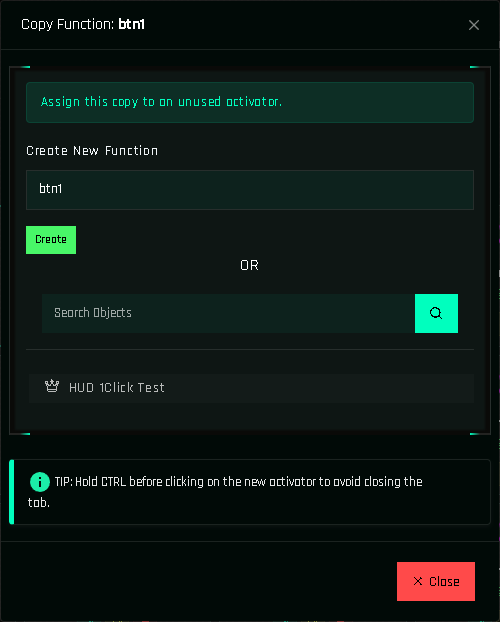
Copy to a new name, or click a button in the list to copy directly onto it. Choose the destination:
- Create New Function: type a name and click Create. This makes a helper function with that name (or a button function, if the name matches a linked prim).
- Click a button in the list below. The copy is assigned to that button. If that button already has a function, nothing happens: delete its function first if you want to replace it.
Open the new function and change what differs: usually just the texture. Use Quick Swap to do it without opening the action.
Hold Ctrl to clone in a row
Hold Ctrl while clicking the destination and the window stays open. Click btn2, btn3, btn4… in one go, then release.
Copy to a target's own project?
Cloning works inside one project. To reuse a whole project in another object, use CLONE in the BUILD menu, which duplicates the entire project.
Cloning and targets
The clone points to the same target as the original. When you build a variant for another object (a demo, or the same HUD for another body), clone the whole project and then use Bulk Edit to swap the target everywhere at once.
Cloning in UI Mode
In UI Mode select a drawn button and press Ctrl+D. The copy keeps the size, color and actions of the original and is placed next to it; drag it into position. Multiple selected buttons are cloned together.