Creating a Condition

Compare two values and run one set of actions when true, another when false.
Requires [add-on] - Conditions & Variables - 1Click inside the object that runs the action.
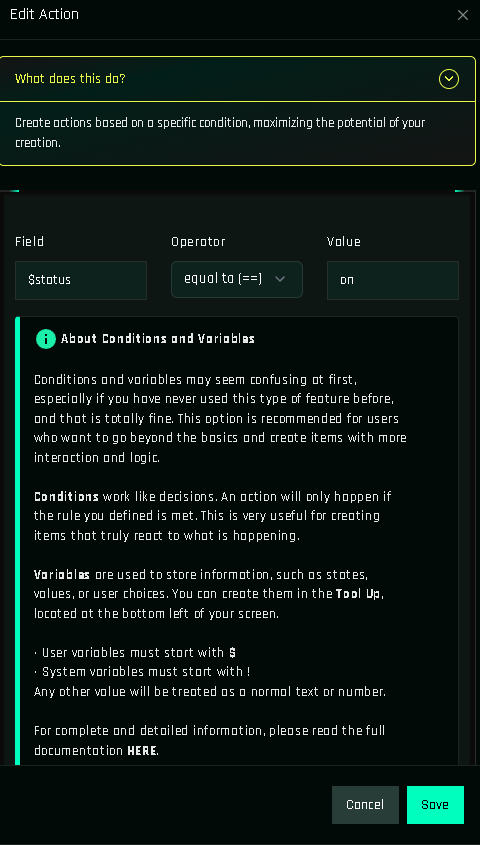
Fields
| Field | Required | What to enter |
|---|---|---|
Field | Yes | The first value. Type a literal, or $ / ! to autocomplete a variable. Up to 70 characters. |
Operator | Yes | One of ==, !=, >, <, >=, <=. See Conditions. |
Value | Yes | The second value. Same rules as Field. |
The success and failure branches are not fields in the form: they are two buttons on the saved condition's card (next step).
Steps
Create the variable(s) you will compare (Creating a Variable) if you have not yet.
Open the button's function and pick Condition in the action grid.
Fill Field, Operator and Value. Typing
$or!opens the variable list.Save. The condition card now shows two buttons: Success and Failure.
Click Success. The panel creates the branch (a hidden function named
cond_…) and opens it; add the actions that should run when the comparison is true. Go back and do the same for Failure. A branch you never open simply does nothing.Drop
[add-on] - Conditions & Variables - 1Clickinto the HUD if it is not there, Save, Build, test.
Worked example: toggle
Variable $state (string) with initial value OFF.
Button "power"
└─ Condition: $state == OFF
   ├─ success → Change Variable $state = ON · Glow $THIS 0.3
   └─ failure → Change Variable $state = OFF · Glow $THIS 0.0
First click: $state is OFF, success runs, glow on, state becomes ON. Second click: failure runs, glow off, state back to OFF. Full guide: ON/OFF Toggle Button.
Worked example: owner check
Button "admin"
└─ Condition: !touched_key == !owner_key
   ├─ success → Open URL, Give Items…
   └─ failure → Message: "Owner only"
Nesting
Put a Condition inside a branch function to chain checks:
Condition A: !touched_key == !owner_key
└─ success branch
   └─ Condition B: !touched_face == 0
      ├─ success → actions for the top face
      └─ failure → actions for the other faces
Common mistakes
- Comparing
$statewithonwhen the variable holdsON. Case matters. - Forgetting the
$:state == OFFcompares the text "state" with "OFF", always false. - Comparing a string variable with a number.
- Testing right after a Change Variable without a short Timer in between (see Change Variable).
- Missing add-on: the object says it needs
[add-on] - Conditions & Variables - 1Click.