Link Names
A target with many prims (a shirt with collar, sleeves and body) needs a way to say "apply this texture to the sleeves only". 1Click Maker does that with the names of the prims, called link names.
Why names, not numbers
Second Life numbers the prims of a linkset (1 = root, 2, 3, …). Those numbers change when you re-upload, re-link, or when a rigged mesh is imported for another body. A HUD built on numbers would texture the wrong part after any of those.
Names do not change. If the collar is called collar in every version of the shirt, an action aimed at collar works on all of them, and on synced copies too.
Name your prims
In the Second Life build tool, select each prim (with Edit linked enabled) and give it a name in the General tab. Good names:
body,collar,sleeve_l,sleeve_rframe,screen,lidwheel_fl,wheel_fr
Rules:
- Same name = same part. Two prims called
sleeveboth receive an action aimed atsleeve. That is how left/right pairs work with one entry. - Names are trimmed. Extra spaces at the start or end are ignored.
- Apostrophes,
&and other special characters are allowed (since 1.2.2). Keep names short anyway. - Meshes exported with
Object/Object.001names should be renamed; the panel cannot tell them apart.
Picking links in an action
Every action that works on prims has a Link Names field. After scanning targets, the field lists the names found in the chosen target. Pick one or several.
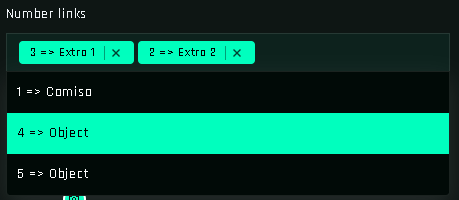
Special entries:
| Entry | Meaning |
|---|---|
| ALL LINKS | Every prim of the target. For color and transparency each prim uses its own faces; for position and rotation the whole object moves as one. |
| (single-prim targets) | The field is hidden; there is only one prim. |
Faces
Next to link names you choose faces (0–7 or All). A face number refers to the same face on every selected link, so sleeve_l + sleeve_r, face 2, changes face 2 on both.
$THIS and the button prim
When the target is $THIS, the link field lists the HUD's own prims. In a button function, $THIS alone means the clicked button, which is handy for highlighting it.
Migrating old projects
Projects built before 1.2.0 used link numbers. After updating the scripts and opening the project, re-scan the targets and open each action: the panel maps old numbers to the names it finds. Check actions whose parts had duplicate names.